Table of Contents
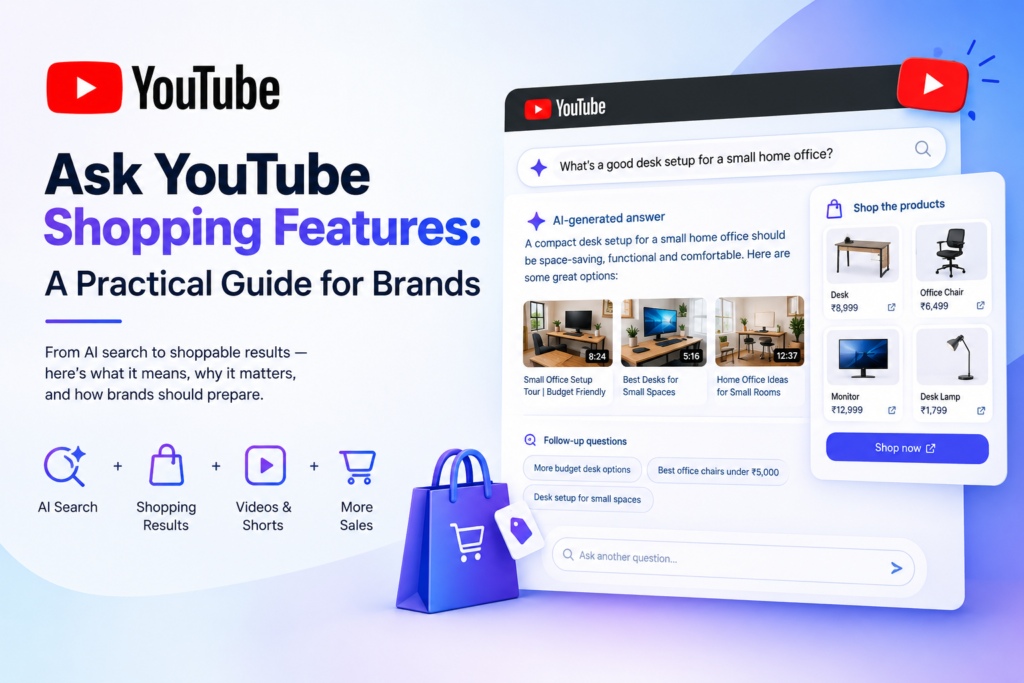
primary keyword : Ask YouTube shopping features.
Meta Description: YouTube is adding shopping features to Ask YouTube AI search. Here’s what it means, why it matters, and how brands should prepare — from an SEO practitioner’s view.
URL Slug: /ask-youtube-shopping-features-guide
YouTube’s AI Search Just Got a Shopping Layer
YouTube’s conversational search tool, Ask YouTube, is no longer just about finding the right video. The platform has started layering shopping features into these AI-generated answers, which means a viewer who asks a product-related question can now get a text summary, relevant video clips, and shoppable product results in a single response — without ever leaving the search page.
This doesn’t come out of nowhere. Over the past couple of years, YouTube has been steadily building toward a full commerce stack: Shopify integration, AI-powered product tagging, an affiliate hub, live shopping tools, and now in-app checkout. Ask YouTube shopping features are the newest piece of that puzzle, and arguably the most visible one, because they put commerce directly inside the search experience rather than leaving it buried in video descriptions or pinned comments.
I work as a freelance digital marketer, mostly on SEO https://en.wikipedia.org/wiki/Search_engine_optimization and content strategy for clients who rely heavily on organic and video-driven discovery. None of the brands I currently work with have run a full campaign through this specific feature yet — it’s simply too new. But that doesn’t make it something to wait out. If anything, the early stage is exactly when it’s worth paying attention, because the ground rules are still being written.
What’s Actually Changing With Ask YouTube
Ask YouTube launched as an experimental conversational search tool, first tested with Premium subscribers before expanding more broadly across the U.S. on desktop, mobile, and TV. Instead of typing a short keyword phrase like “best budget webcam,” users can now ask something closer to how they’d phrase it out loud: “what’s a good budget webcam for streaming that doesn’t need extra lighting?”
The response isn’t a simple list of ten blue links or video thumbnails. It’s a structured answer that blends:
- A short, AI-written summary addressing the question directly
- Cited video clips and Shorts, often timestamped to the exact relevant moment
- Suggested follow-up prompts so the user can refine or go deeper
- A floating search box that keeps the conversation going without restarting the search
The Shopping Layer, Specifically
The shopping addition builds directly on that structure. Ask YouTube shopping features can now surface shoppable product cards for queries with clear purchase intent, pulled from creators’ linked stores, tagged products in videos, or brand catalogs synced through YouTube Shopping. So a query like “what desk setup is good for a small home office” might return an AI summary, a few cited videos showing desk setups, and product cards for the desks, monitors, or lighting mentioned — all clickable, with some offering in-app checkout depending on the creator’s setup.
This mirrors a pattern that’s already playing out in traditional Google Search, where AI Overviews and AI Mode increasingly fold shopping results into the generated answer itself, rather than keeping them in a separate shopping tab. YouTube adopting the same approach isn’t surprising. It’s consistent with where the rest of Google’s search products are heading.
Where This Fits Into YouTube’s Broader Commerce Push
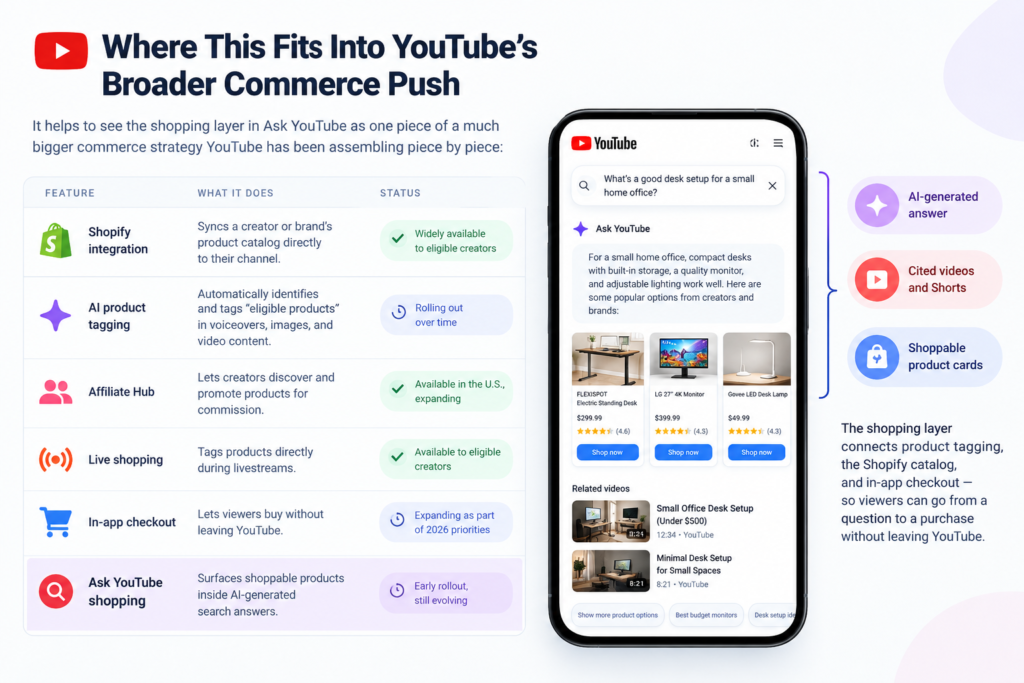
It helps to see the shopping layer in Ask YouTube as one piece of a much bigger commerce strategy YouTube has been assembling piece by piece:
| Feature | What It Does | Status |
| Shopify integration | Syncs a creator or brand’s product catalog directly to their channel | Widely available to eligible creators |
| AI product tagging | Automatically identifies and tags “eligible products” in voiceovers, images, and video content | Rolling out over time |
| Affiliate Hub | Lets creators discover and promote products for commission | Available in the U.S., expanding |
| Live shopping | Tags products directly during livestreams | Available to eligible creators |
| In-app checkout | Lets viewers buy without leaving YouTube | Expanding as part of 2026 priorities |
| Ask YouTube shopping | Surfaces shoppable products inside AI-generated search answers | Early rollout, still evolving |
Seen this way, the shopping layer in Ask YouTube isn’t a standalone experiment — it’s the connective tissue that ties product tagging, the Shopify catalog, and in-app checkout together into something a viewer actually encounters at the moment they’re asking a question, which is usually the moment they’re closest to making a decision.
Why This Matters for Brands (Even Without Data Yet)
I’ll be upfront about this: most of the brands I work with haven’t tested YouTube’s shopping tools in any serious way yet. Interest in product tagging, Shopify syncing, and affiliate opportunities is real and growing, but very few clients have enough performance data to say with confidence “this drives sales.” That’s a normal place to be with a feature this new — it doesn’t mean Ask YouTube shopping features are safe to ignore.
Here’s the practical reasoning behind that. AI-driven discovery is changing how people research and compare products before they ever reach a retailer’s website. Ask YouTube shopping features can bring product details, pricing, and reviews into shopping-focused answers. The brands that show up in these answers are the ones whose product information was already clean, structured, and consistent — not the ones scrambling to “optimize for AI” after the fact.
For brands preparing for Ask YouTube shopping features, the priority should be accurate product information, consistent pricing, updated availability, strong content, and structured data. These fundamentals can help brands make their products easier for both shoppers and AI-driven search experiences to understand.
A few reasons preparing now makes more sense than waiting for the feature to mature:
- Early movers learn faster. Brands testing shoppable tags and affiliate links now will understand what actually converts before the tactics become standard practice and the advantage disappears.
- The fundamentals do double duty. Accurate titles, descriptions, pricing, availability, and structured data help human shoppers and AI systems in exactly the same way — there’s no separate “AI version” of good product data.
- Waiting has a real cost. By the time a channel is “proven” with case studies and benchmarks, the brands with the strongest foundations are usually already several steps ahead, and everyone else is playing catch-up.
Ask YouTube Shopping vs. Google AI Mode Shopping
Clients often ask how this compares to the AI Mode shopping features already showing up in Google Search. The mechanics are similar, but the context is different enough to matter for strategy:
| Ask YouTube | Google AI Mode | |
| Primary content type | Video, Shorts, creator-driven | Web pages, product feeds, reviews |
| Discovery trigger | Conversational, video-adjacent questions | Conversational, general search questions |
| Product source | Creator-tagged products, linked stores | Merchant feeds, structured data on web pages |
| Trust signal | Creator credibility and demonstration | Site authority, reviews, structured data |
| Checkout | Increasingly in-app | Redirects to merchant site |
The overlap is worth noting: in both cases, structured, accurate, and consistent product data is what allows AI systems to surface a brand confidently. A brand that’s already doing the groundwork for AI Mode shopping is largely doing the same groundwork that will help it show up in Ask YouTube shopping results, too.
The Most Common Mistake I See Brands Make
Working directly with clients on SEO and content strategy, the mistake I run into most often is treating AI search as a completely separate discipline from everything else a brand is already supposed to be doing. Teams get excited about “optimizing for AI” while their basic product data is still incomplete or inconsistent — mismatched pricing between the website and marketplace listings, outdated stock availability, thin or copy-pasted product descriptions, missing structured data, or product images that don’t match what’s actually shipped. With Ask YouTube shopping features becoming part of the AI-driven shopping experience, these fundamentals are becoming even more important.
AI systems, like human shoppers, struggle to recommend a product confidently when the underlying information is messy or contradictory. There’s no special trick that gets around that. The fix is the same one that’s always applied to good SEO and e-commerce practice — it just matters more now because the AI layer amplifies whatever data quality already exists.
AI systems, like human shoppers, struggle to recommend a product confidently when the underlying information is messy or contradictory. Ask YouTube shopping features rely on clear, accurate product information to help surface relevant products and shopping results. There’s no special trick that gets around poor data quality. The fix is the same one that’s always applied to good SEO and e-commerce practice — it just matters more now because the AI layer amplifies whatever data quality already exists.
- Accurate, consistent product titles and descriptions across every channel and platform
- Structured data (schema markup) that clearly defines product, price, and availability
- Genuine reviews and visible social proof
- Clear, current pricing with no contradictions between platforms
- High-quality product imagery that actually matches what’s being sold
The second mistake, closely related, is expecting fast results. AI search features like this are still evolving month to month. Treating them as a one-time SEO project rather than an ongoing testing and optimization process is a good way to burn a budget on something that can’t yet be measured properly, because the feature itself hasn’t stabilized.
A Practical Readiness Checklist for Brands
Given how early this still is, my advice to clients is to stay in “test and learn” mode rather than reallocating a large part of the marketing budget toward YouTube shopping features right away. A realistic starting checklist looks like this:
| Action | Why It Matters |
| Audit product data consistency across platforms | AI search pulls from whatever data exists — inconsistency undermines trust and accuracy |
| Add or update structured data for products | Helps both traditional search and AI-driven results understand your catalog correctly |
| Pilot product tagging with a small set of SKUs | Limits risk while still generating real performance data to learn from |
| Track shopping-referral traffic separately | Keeps this channel measurable instead of blending it into general YouTube traffic |
| Review creator partnerships for shopping fit | Not every creator relationship translates well into a shoppable format |
| Revisit the strategy quarterly | The feature set is still changing quickly; a plan from six months ago may already be outdated |
Risks and Limitations Worth Keeping in Mind
None of this means brands should treat Ask YouTube shopping as a guaranteed win. A few honest caveats worth flagging:
- Availability is still limited and uneven. Rollout has been staged by region, device, and account type, so results will vary depending on where and how a brand’s audience is actually searching.
- AI-generated answers can get things wrong. YouTube itself has acknowledged that experimental AI features can misfire, the same way AI Overviews sometimes do in Search. That includes shopping recommendations.
- Attribution is still messy. Because the shopping layer blends video, AI summary, and product cards, isolating exactly what drove a purchase can be harder than with a traditional shopping ad.
- Not every product category benefits equally. Categories that are naturally demonstrated on video — tech, home goods, beauty, fitness gear — are likely to see more benefit than categories with little natural video overlap.
What This Means for Creators
It’s worth a brief note on the other side of this equation. Creators who already tag products, run affiliate links, or sync a Shopify store may be better positioned to benefit from Ask YouTube shopping features, since the feature draws on product data that is already structured and available.
For creators who haven’t set any of this up yet, Ask YouTube shopping features create an opportunity to connect product tagging, affiliate links, and store integrations with AI-driven discovery. The practical starting point is the same as it is for brands: get product tagging and store integration in place before worrying about how to “optimize” specifically for the AI layer.
As Ask YouTube shopping features continue to develop, creators should keep their product information accurate, update their linked catalogs, and test which content generates meaningful shopping engagement. This gives creators a stronger foundation for adapting as YouTube expands its shopping experience.
FAQs
Is Ask YouTube shopping available to everyone yet?
Availability for Ask YouTube shopping features has been expanding gradually, starting with Premium subscribers in the U.S. before rolling out more broadly across signed-in users. Coverage can still vary by region, device, and account type, so it’s worth checking current availability before building a strategy around it.
Do I need a Shopify store to use YouTube’s shopping features?
Not necessarily. However, Ask YouTube shopping features can work with product catalogs, creator-linked stores, and other YouTube Shopping integrations. YouTube’s partnership with Shopify also makes syncing a product catalog and enabling in-app checkout considerably easier for eligible creators and merchants.
Will Ask YouTube shopping features replace traditional YouTube SEO?
No. Ask YouTube shopping features build on traditional YouTube SEO rather than replacing it. Structured data, accurate product information, strong video content, relevant titles, and useful descriptions still matter when helping YouTube understand and surface your content.
How long until Ask YouTube shopping features become a reliable marketing channel?
There’s no fixed timeline. Ask YouTube shopping features are still evolving, and availability, functionality, and measurement may continue to change. Treating them as an evolving channel to test, rather than a finished product to master, is a practical approach right now.
Should small brands use Ask YouTube shopping features?
Small brands can start cautiously. Ask YouTube shopping features allow businesses with clean product data and a modest video presence to test product tagging and shopping integrations without making a large budget commitment. This can help brands gather real performance data while the channel continues to develop.
Key Takeaways
Ask YouTube shopping features are part of a broader shift toward AI-driven product discovery, not an isolated experiment. Brands don’t need to overhaul their entire strategy overnight, but preparing for Ask YouTube shopping features means having clean, consistent product data and a willingness to test in small, measurable steps.
As Ask YouTube shopping features continue to evolve, businesses should treat them as an ongoing optimization opportunity rather than a one-time SEO task. This approach can help brands learn what works while adapting their strategy as the feature matures.
As a best digital marketing expert in Thrissur, I help businesses improve their online visibility through SEO, social media marketing, content strategy, and website optimization. My goal is to create practical, result-focused digital marketing strategies that help businesses reach the right audience and grow online.