Table of Contents
Meta Description: How to advertise in Google AI Mode for ecommerce — what’s changing, common feed mistakes, and where to focus first to stay visible.
URL Slug: /advertise-google-ai-mode-ecommerce
Primary Keyword: advertise in Google AI Mode for ecommerce
Related Keywords: Google AI Mode shopping ads, AI Mode SEO ecommerce, optimize products for Google AI Mode, AI-powered shopping search, Google AI Mode product visibility
How to Advertise in Google AI Mode for Ecommerce
Search keeps reshaping itself, and honestly, it’s moving faster than most store owners can track. If you’ve caught yourself wondering how to advertise in Google AI Mode for ecommerce, you’re far from alone. The old Google Ads playbook doesn’t carry over cleanly, which makes it feel like you’re aiming at a target that keeps shifting on you.
Here’s where it starts: learning how to advertise in Google AI Mode for ecommerce means first accepting that product discovery works differently now. Keyword rankings and individual product pages used to be the whole game. Not anymore. Brands now have to account for product information, relevance, customer intent, structured data, feeds, and — maybe most importantly — the actual context behind why someone searched in the first place.
I haven’t run paid campaigns inside AI Mode myself yet — not many people have at this stage. But I’ve spent a good chunk of time watching how it behaves, tracking the shifts in how Google surfaces products, and pulling together what actually seems to matter versus what’s just noise. That’s the lens for this piece: less “here’s my case study,” more “here’s how to advertise in Google AI Mode for ecommerce and what you should prepare for.”
What’s Actually Different About AI Mode for Shopping
Traditional search rewarded you for ranking a product page against a keyword. Google AI Mode for ecommerce works differently. Instead of simply matching a query to a page, AI-powered search can interpret a shopper’s broader need and connect that intent with relevant products using attributes, use cases, product information, and context.
That means advertising in Google AI Mode for ecommerce isn’t just about adding more keywords to your campaigns. Ecommerce businesses need to make sure Google can clearly understand what their products are, who they’re for, what features they offer, and which customer needs they solve.
For anyone learning how to advertise in Google AI Mode for ecommerce, the key takeaway is simple: product data and customer intent are becoming increasingly important alongside traditional advertising signals.
A few patterns stand out:
- Product relevance goes deeper than keywords. AI Mode connects detailed queries to products based on specs and use cases, not just exact-match phrasing.
- Structured data carries more weight. Price, availability, reviews, and specifications become the raw material AI Mode uses to make its call — not supporting details, but the main event.
- Comparison shopping gets broader. A query that involves comparing products or features can pull in a wider set of options, rather than a tidy list of blue links.
- Discovery becomes conversational. Shoppers can ask follow-up questions, so a single search turns into an ongoing back-and-forth rather than a one-shot result.
- Consistency across your site and merchant data matters more. If your product feed says one thing and your website says another, that’s a trust problem Google now has more ways to notice.
The upshot: the question isn’t “how do I rank for this product keyword?” anymore. It’s “does my product carry enough accurate, structured information for Google to know it genuinely fits this shopper’s need?” That’s a different job, and it rewards different work.
Getting Your Products Ready for AI Mode
None of this requires reinventing your store. It mostly means tightening what you already have. Here’s where to start:
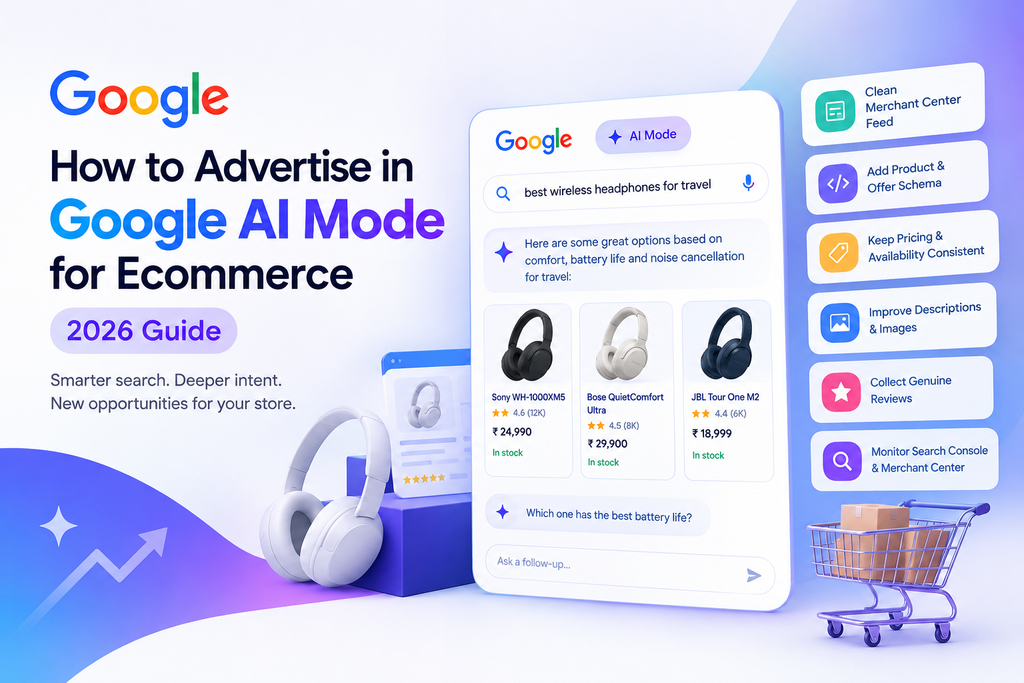
- Clean up your Merchant Center feed. If you’re learning how to advertise in Google AI Mode for ecommerce, start with accurate product titles, current prices, real-time availability, and complete attributes. This is the foundation everything else sits on.
- Add Product and Offer schema markup. Structured data gives Google a clear and unambiguous way to understand your products instead of relying entirely on page content. This can be an important part of your strategy when you advertise in Google AI Mode for ecommerce.
- Keep pricing and availability consistent. Make sure information matches across your website, Merchant Center feed, and marketplace listings. When you’re trying to advertise in Google AI Mode for ecommerce, inconsistent product information can create unnecessary problems.
- Improve product descriptions and images. Thin or generic descriptions give AI-powered search less useful information when determining product relevance. Strong descriptions, detailed attributes, and high-quality images can help ecommerce businesses prepare to advertise in Google AI Mode for ecommerce.
- Collect genuine customer reviews. Authentic reviews provide useful trust and product-context signals for shoppers. As you develop your strategy for advertising in Google AI Mode for ecommerce, focus on collecting genuine customer feedback rather than relying on artificial or low-quality reviews.
- Monitor Search Console and Merchant Center regularly. Check for feed errors, indexing problems, product disapprovals, and other technical issues. If your goal is to advertise in Google AI Mode for ecommerce, regularly monitoring these platforms can help you identify problems before they affect your product visibility.
| Action | Why It Matters |
| Merchant Center feed accuracy | Foundation for how Google understands your products |
| Product/Offer schema | Gives structured, machine-readable product context |
| Consistent pricing/availability | Builds trust across surfaces |
| Strong descriptions and images | Gives AI Mode more to match against |
| Genuine reviews | Reinforces trustworthiness signals |
| Regular monitoring | Catches issues before they cost visibility |
Mistakes That Are Already Hurting Stores
A few issues show up constantly, and they’re the kind of thing that’s easy to overlook until it costs you visibility:
- Inconsistent or outdated Merchant Center feeds
- Prices or availability that haven’t been updated in a while
- Thin product descriptions that don’t say much beyond the obvious
- Missing structured data entirely
- Weak or low-quality product images
- Incomplete product attributes (size, material, use case, etc.)
Each of these makes it harder for Google’s systems to confidently understand what a product actually is — and if the system isn’t confident, it’s not going to surface that product in a conversational, AI-driven result.
Where to Focus First
If you can only tackle one or two things this month, start here. If your goal is to advertise in Google AI Mode for ecommerce, focus on the product data and pages that Google uses to understand your store.
1. Clean up your Merchant Center feed. Fix titles, prices, availability, images, and any missing attributes. A clean product feed is one of the first things to prioritize when you want to advertise in Google AI Mode for ecommerce. Nothing else works well on top of messy or inaccurate product data.
2. Improve your product pages. Add complete, useful descriptions and accurate Product and Offer schema once your feed is solid. When you advertise in Google AI Mode for ecommerce, detailed product information gives search systems more context about what you’re selling and which shoppers your products can serve.
Feed first, schema second. If you’re figuring out how to advertise in Google AI Mode for ecommerce, don’t rush into structured data before fixing your underlying product information. Layering better structured data on top of inaccurate feed data simply gives Google a clearer read on the wrong information.
FAQs
Do I need to run paid ads specifically for AI Mode?
Not necessarily — right now, a lot of what determines whether AI Mode surfaces your product well comes down to the same underlying feed and site data that supports Shopping https://en.wikipedia.org/wiki/Shopping ads generally. Getting that foundation right pays off across both.
How long does it take to see results from these changes?
There’s no fixed timeline, and it varies by store size and how far off your feed currently is. Cleaning up obvious data issues tends to show impact faster than something like schema, which works more as a long-term trust signal.
Is this only relevant to large ecommerce stores?
No — if anything, smaller stores with cleaner, more accurate data can compete well here, since AI Mode is matching on data quality rather than brand size alone.
Conclusion
AI Mode is still early, and nobody has a fully proven playbook for it yet. But the direction is clear enough: accurate, structured, trustworthy product data matters more than ever, and keyword-chasing matters less. Start with your feed, layer in schema, keep everything consistent, and you’ll be ahead of most stores that are still optimizing for a search experience that’s already shifting underneath them.
As a best digital marketing expert in Thrissur, I help businesses improve their online visibility through SEO, social media marketing, content strategy, and website optimization. My goal is to create practical, result-focused digital marketing strategies that help businesses reach the right audience and grow online.